Skip to content
RustkitRust companion
Unofficial companion for Rust

Stop alt-tabbing out of Rust

A free Windows app that works over the game: a siren when a Smart Alarm goes off, your raid one target at a time, KEEP or DESTROY beside each clone, and your circuit one step at a time.

Download for Windows

Version 0.2.124 · 11.1 MB · 23 Nov 2026

Signed. Windows may still warn. See what to press

The Rustkit app runs on a Windows PC. Send yourself the link, or use the tools here.

On a Windows PC? Download the app

Or use it in the browser Every calculator and planner, nothing to install.

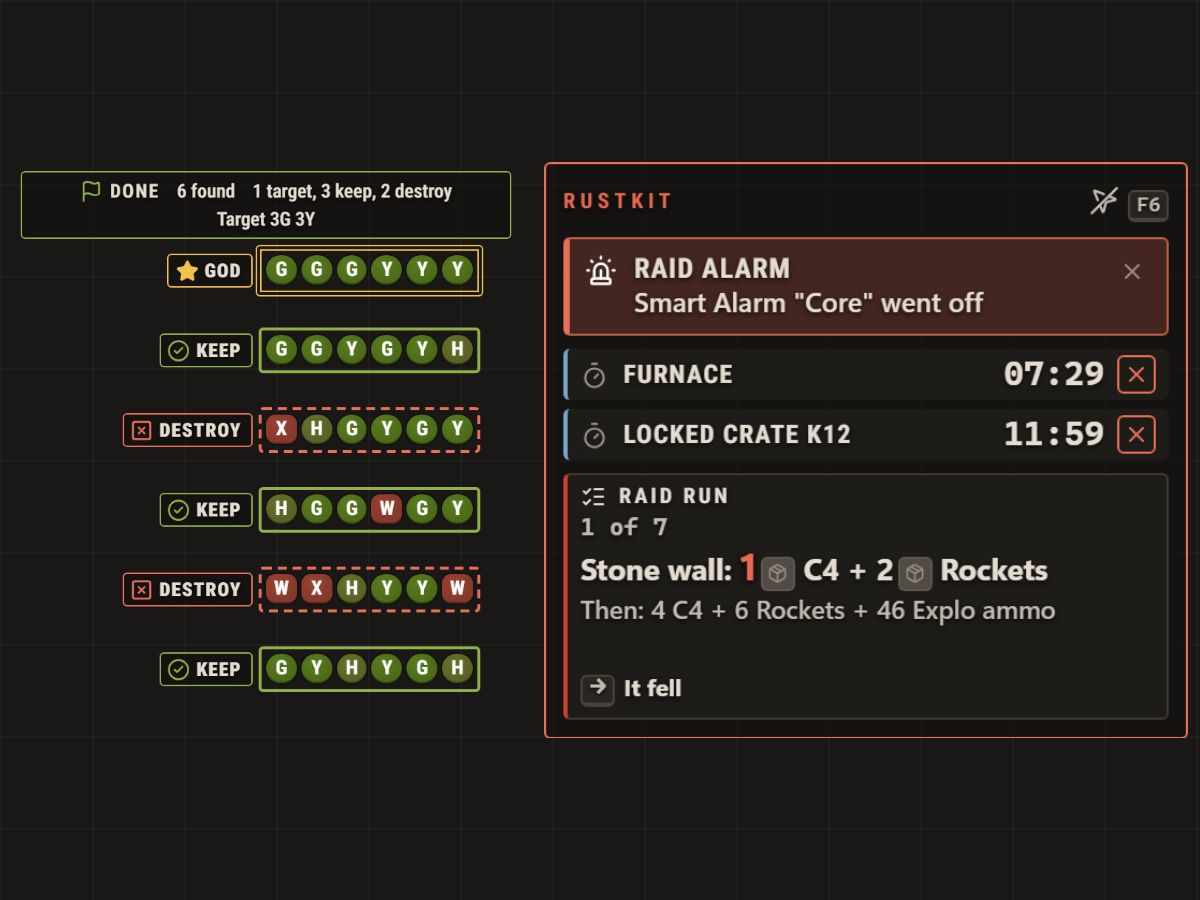
Rustkit's overlay on a plain background: a raid alarm, the raid run's card with the next target and what to use on it, two timers, and KEEP and DESTROY marks beside a row of clones.
Only in the app

Over the game, while you play

A browser tab cannot draw over Rust. The app can, in a window your clicks pass through.

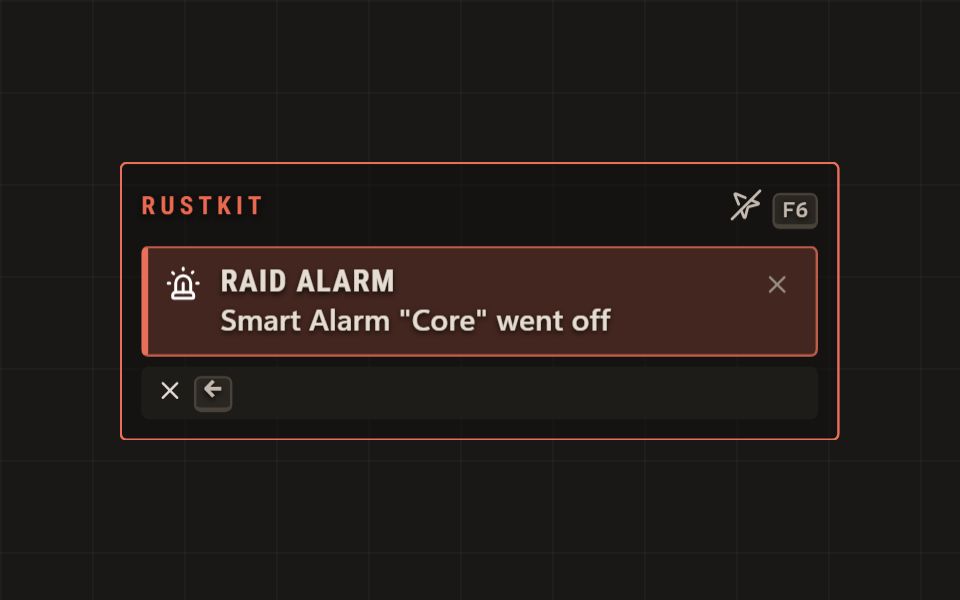
A red Raid alarm card on the overlay: Smart Alarm Core went off.

Raid alarms with the window closed

Close the window and Rustkit keeps listening. A Smart Alarm brings a Windows notification and a siren, and Discord or your phone if you set them up.

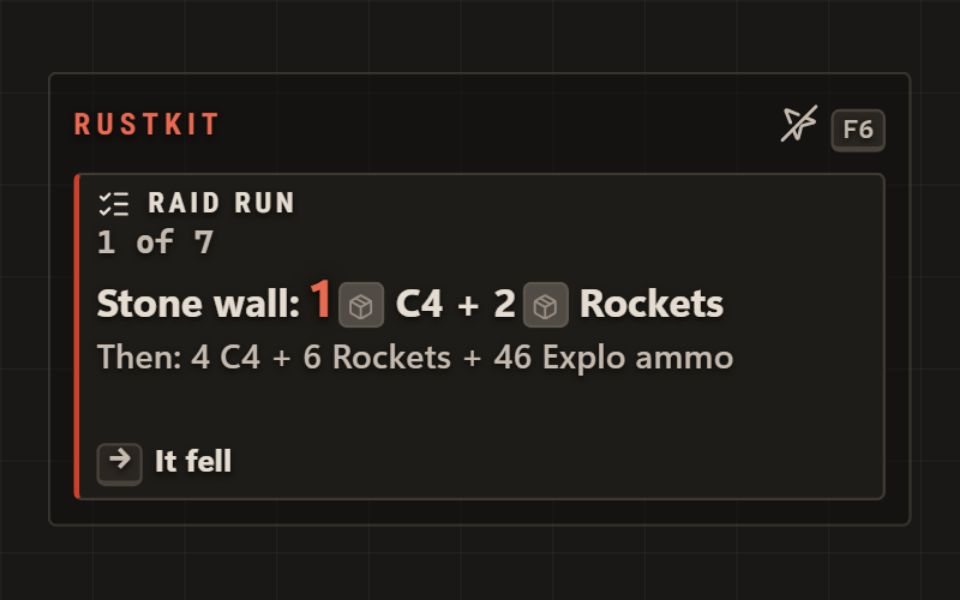
The raid run on the overlay: target 1 of 7, a stone wall, what to use on it, what comes after it, and the Right arrow for It fell.

Your raid, one target at a time

Choose the cheapest or the fastest way, press Start the raid, and the overlay shows each target in turn with what to use on it.
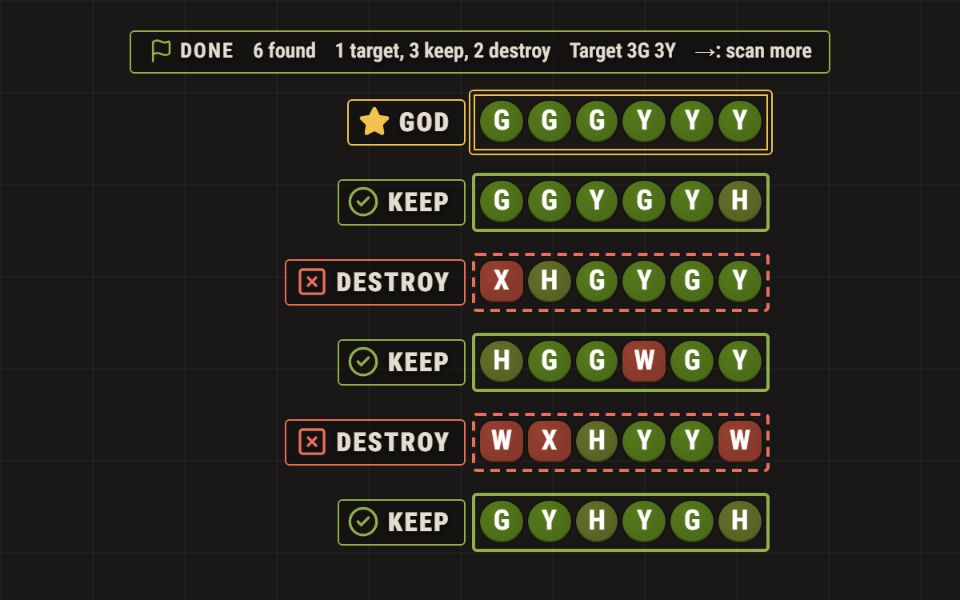
KEEP, DESTROY and target tags beside rows of genes.

KEEP or DESTROY beside each clone you breed

Scan a box, your inventory or a planter. The verdict, or the job a clone has, shows beside it in the game. Then Show in game puts the plan's steps over the game, one at a time.
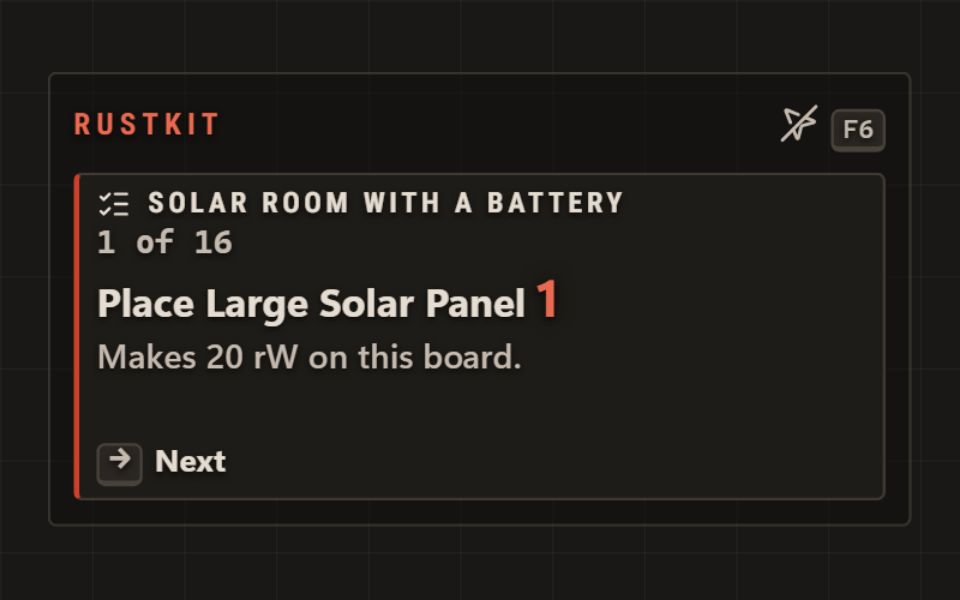
Timers, Quick lookup and the next step sit on the overlay too. ← is Back and → is Next, Ctrl+Shift+O shows or hides the overlay, Ctrl+Shift+I opens Quick lookup. Left Ctrl is crouch in Rust, so you duck while you hold it, and Rust's chat does not get ← and →. Rust's default keys leave the arrows, O and I free. Every key can be changed.

Tips over the game too: a short card while Rust runs, when one fits what you are doing. Most need your server paired. Settings turns them on or off.

A minimap over the game too: you and your team on the server's map. It is off until you switch on Minimap in Settings, under Overlay, and needs your server paired.

The Rustkit app runs on a Windows PC. Send yourself the link, or use the tools here.

On a Windows PC? Download the app
Install

What happens after you click

Up to 8 clicks from here to Rustkit running. The installer is signed. Windows can still warn about a new program it has not seen often.

What the install looks like on your PC
  1. Open the file

    Your browser saves Rustkit-setup.exe (11.1 MB). Open it from the browser's downloads.

  2. Windows protected your PC

    It may not show. If it does, press More info, then Run anyway.

  3. Install

    Press Next, Install, Next and Finish. It installs for your Windows user only, so it asks for no admin password.

  4. Rustkit opens

    Leave Run Rustkit ticked and it starts.

    To link your server, sign in with Steam once and press Pair with Server in Rust's pause menu.

Check the file

SHA-256 of version 0.2.124:

53B3668681B20A96C48B60F231C7F6B90A4F151222E8AAA12F021A5E169DD53D

In PowerShell, in your Downloads folder: Get-FileHash Rustkit-setup.exe. The two must match.

Download Rustkit only from rustkit.gg.

Updates install from inside the app, which checks each one against Rustkit's own key first.

To remove it: Windows Settings, Apps, Rustkit, Uninstall.

The Rustkit app runs on a Windows PC. Send yourself the link, or use the tools here.

On a Windows PC? Download the app
Safety

Can it get me banned?

Only Facepunch and Easy Anti-Cheat can answer that, and Facepunch has not endorsed Rustkit. What we can show you is what the app does and never does.

What it never does

  • It never opens the game's process, so nothing reads or writes its memory.
  • It puts no code into the game and hooks nothing.
  • It sends no keys and no clicks to the game.
  • It never changes the game's files.

What it uses

  • Rust+, Facepunch's own companion service, for the map, team chat and alarms: the same one the official Rust+ app uses.
  • A window on top of the game that your clicks pass through.
  • A screen share you start and stop, for the gene scanner: the kind Discord uses to share your screen.
  • Windows hotkeys for its own keys. It reads two Rust files and changes neither: keys.cfg for your binds, so its keys stay off yours, and client.cfg for the screen mode, UI scale and language.
  • The names of the programs that run, so an update waits until Rust is closed, and so the log can name another program whose window is titled Rustkit.

The Rustkit app runs on a Windows PC. Send yourself the link, or use the tools here.

On a Windows PC? Download the app
Tools

Every Rust tool, in one free app

Raiding, building, farming or running a clan: the whole wipe is here, and every calculator and planner also works in the browser.

Checked on Rust build 26498655 (Nov 2026).

Every tool, with what it does

Tips

  • Did you know Short facts most Rust players never learn: keycard and puzzle timers, radiation, decay, loot, each with its source.

Live server

  • Rust+ link Connect to your Rust server with Rust+: pair with Steam, see players, queue, wipe age and in-game time, manage smart devices.
  • Live map Your server map, live: your team, the monuments and your own pins and routes. Pan, zoom, measure, copy grid squares.
  • Team Team mates online, dead or AFK and where; team chat from your desk; a chat bot for !pop, !time, !wipe, !upkeep and more.
  • Events & alerts The event log of this wipe, and alerts for raids, upkeep and your team to Discord, your phone, sound or the overlay.
  • Timers & sightings Count down what you saw and your own chores: known lengths in one tap, a ring when it ends, and timers your team can share.
  • Smart devices Flip Smart Switches, get a raid siren from Smart Alarms, and see how long each Tool Cupboard keeps your base protected.
  • Shops & trades Cheapest place to buy, best place to sell, profit trades and deal alerts, on a server that still sends its vending machines.
  • Phone screen Scan a code and your phone becomes a second screen for Rustkit: the live map following you, your timers and your alerts while you play full screen.
  • Cloud link Keep raid alarms, upkeep warnings and the chat bot running 24/7 on your own small server, with your PC off.
  • Rust+ not working after the 5 Nov 2026 patch Since the 5 Nov 2026 update many Rust+ apps and bots show servers offline: what changed, how to pair and sign in again, and what no app can fix.
  • Phone view The page a phone opens after scanning the code in Rustkit: your live map, timers and alerts, view only.

Raiding and combat

  • Raid calculator Pick what to break and get the cheapest way through each target: what to bring, the sulfur it costs and the craft time, and what your own base costs to raid.
  • Combat lab Time to kill and shots to kill for every gun, ammo and attachment against any kit, armour protection by body region, and the best kit for your workbench.
  • Raid chart How many rockets, C4, satchels and explosive ammo break every wall, door and deployable in Rust, and what each costs in sulfur.

Plants and breeding

  • Gene scanner Share the screen Rust is on: gene circles are read live, clones go to your list with their verdict, and the desktop app marks keep, hold or destroy next to each clone in a storage box, inventory or planter.
  • Breeding lab Pick the clone you want and add the clones you have: get exactly what to plant where, for any planter.
  • Planter simulator Check what a planter gives: put plants in any planter, or open a plan step, and see each gene's totals, ties and the result.
  • Breeding guide How a cross works, how sure each rule is, planters, ties and planting order, timing per crop, seeds and safe clones.
  • Livestock What Rust has for cows, sheep, chickens and horses, each number with its source.

Electricity

  • Power planner Will your base have power all night? What you run, power sources and batteries, by day and at night, with fuel.
  • Circuit designer Drag-and-drop Rust circuits with live power on every wire, batteries charging in real time, where your power goes, and 12 examples that teach.

Crafting and items

  • Item database Every item with its recipe tree, recycle yields, loot odds, raid numbers and tech tree path.
  • Crafting calculator Everything you want to craft, expanded to raw resources: what you have, workbench, blueprints, craft time and sulfur.
  • Recycle chart What one of each common component gives at the safe zone, monument and power plant recyclers: scrap, metal and cloth.
  • Recycler What loot gives back at the safe zone, monument and power plant recyclers, batch time and the best scrap sources.
  • Furnace planner Smelt time, wood and charcoal for any amount of ore in small, large and electric furnaces or the oil refinery.
  • Tech tree Workbench 1/2/3 and Engineering trees: cheapest unlock path to any blueprint, research vs tree cost, scrap budget.

Servers and wipes

  • Servers & wipes Find a server, see when it wiped and when it wipes next, favourite it and get a wipe alert.
  • Next forced wipe The next force wipe as a live countdown in your time and UK time, the next six dates and the first-Thursday rule.
  • Wipe planner Checklist for the first hours of a wipe (solo, duo, group): scrap, benches and farming goals priced from the tech tree.
  • Wipe analytics This wipe in numbers: when your team plays, when you get raided, your farm and a report card to share.
  • Player tracker List players by name per server, or follow the player count; get came-online, went-offline and count alerts and their usual hours.

Base and upkeep

  • Upkeep & build cost What your base costs to build and keep each day, what to put in the TC, decay timers and upgrade costs.
  • Base designer Draw your base floor by floor: build cost, upkeep per day, the cheapest raid path to your TC and loot rooms, and the upgrades that raise it most.
  • Upkeep chart Upkeep per block by grade and base size, and how long twig, wood, stone, metal and armored last once the Tool Cupboard runs dry.
  • Base finder Pick a base for your team by its size, what a raid on it costs, its upkeep a day and what it has, then fly through it or open it in the Base designer.
  • Where to live Paste a map link, a server address or a server name and open that server on the map with the best spots to build a base.
  • Base in 3D Fly round and walk through a base from the Base designer in 3D, look into each floor and tap a piece for its name and HP.

Monuments and loot

  • Monuments Every monument: keycard puzzle steps, what to bring, crates, recyclers, radiation, and the keycard route to any red room.
  • Loot tables What every crate, barrel and NPC drops with the odds, and where to find any item, best odds first.
  • Safe-zone shops & vehicles What the Outpost, Bandit Camp, Fishing Village and stables sell and buy for scrap, a shopping list with the scrap you need, and every vehicle with its price, fuel and decay.
  • Gambling odds The odds of the Big Wheel and blackjack, what is known about slots and poker, what an hour of each costs in Scrap, and how a wheel session ends.
Questions

Before you ask

Does it need my Steam password?
  • No. The desktop app opens Facepunch's Rust+ login, which sends you to Steam's own sign-in page: your password goes to Steam, and Rustkit never reads or stores it (that window is private and keeps no cookies).
  • Facepunch's page warns that you are signing in to a third-party app; that app is Rustkit. The Rust+ token it gets back can see your paired servers and devices, your position, your team, and team and clan chat.
  • Rustkit keeps only that token and your SteamID, on your PC. The web version needs no login at all.
Does the overlay work in fullscreen?

Yes, with Rust's Fullscreen and Windowed settings. It cannot show over exclusive fullscreen, so if you added the launch option -window-mode exclusive in Steam, remove it.

Does the app run on a Mac, on Linux or on a phone?

No, the app is for Windows. On anything else, every calculator and planner works in the browser.

How do I uninstall Rustkit, and what stays on my PC?

From Windows Settings, Apps. The uninstaller asks whether to also remove your Rust+ sign-in, settings and alarms from this PC: ticked they go, unticked they stay.

Does it work with Rust Console Edition?

The calculators, planners and the breeding lab work for anyone, but their numbers come from PC Rust and console balance can lag behind. The live features cannot: Facepunch's Rust+ does not support Console Edition.

What is Rust+?

Facepunch's official companion service. Once you pair a server from the pause menu in game, it shares the map, your team, team chat and the smart devices you pair: switches, alarms and storage monitors. Rustkit is a Rust+ client with a lot more on top.

Where does my data go?
  • Your device: settings, plans and paired servers stay in this browser or the desktop app's data folder, and Settings exports them as a backup file.
  • Your game server: the desktop app talks to it over Rust+ through Facepunch's Rust+ relay (companion-rust.facepunch.com). It connects directly only to a server paired by its address, or when that relay does not answer. From the website, Rust+ passes through our relay once you agree, your player token included; our relay keeps no messages or tokens. Server lookups (a server's details, who is online, Steam's server list), the Steam profiles you track and a server's map layers go through our relay as well, with no player token.
  • BattleMetrics and Steam: the server lists of the Servers & wipes page.
  • Discord, ntfy and your own Cloud link server (Docker, Fly.io, Railway or this PC): only if you set them up.
  • Facepunch's Rust+ service and its push route (Expo and Google's push service), the same route the official app uses, so a pairing message can reach your PC. Phone push, if you turn it on, goes from your Cloud link server through your phone's push service (Google, Apple, Mozilla or Microsoft), encrypted so that service cannot read it.
  • Facepunch's file server (files.facepunch.com): the pictures of items and of a server's map. Your browser or the desktop app asks for them itself, so Facepunch sees your IP address.
  • rustkit.gg: the desktop app asks it for updates on its own, and for Steam's server list (without a Steam key of your own), the Steam profiles you track and a server's map layers, with no player token.
Sources

Set it up before wipe day.

Install, sign in with Steam once, press Pair with Server in game. Your server is in.

The Rustkit app runs on a Windows PC. Send yourself the link, or use the tools here.

On a Windows PC? Download the app